

Solutions · AI employees
AI employees that answer to your team
An AI employee is an agent with a standing role, such as accounts payable or shipment tracking. It works inside limits your operating model sets, hands anything it cannot decide to a person on your team, and leaves a record of everything it does.
01The role
Everything about the job is written down
The role lives in your operating model, not in a prompt: the work it does, the systems it can reach, the actions it may take on its own, the ones that wait for a person, and what it must escalate. You can read it, your team reviews every change to it, and the platform enforces it on every action.
It also has an account of its own, so its work is attributed to it rather than to whoever set it up, and a result it posts carries its name.
Accounts payable agent
- Team
- Finance
- Approvals go to
- Whoever assigned the work, or the AP team
- Takes work from
- Kate in Console, the AP inbox, a run each morning
- Runs on its own
- Match each invoice line to the purchase order and what was received
- Waits for approval
- Release a held invoice. Email a vendor.
- Never
- Change a vendor’s bank details
- Checked by
- A supervisor agent, before anything reaches a person
- On the record
- Every match, every hold, and who approved it
Illustrative. What an agent can do depends on the workflows set up for your organization.
02How work reaches it
The same ways work reaches anyone on the team
And it keeps going when nobody is logged in. Close the browser mid-run and the work carries on.
From Kate
Ask in Console.
Kate assigns the work to the agent responsible and relays its questions and results in your conversation.
By email
Give it an inbox.
Mail sent to the address it is given can start its work, with the thread and attachments carried into the steps.
On a schedule
Run it on a timetable.
A workflow can run it on a timetable, such as every morning or at month end, without anyone asking.
On a change
Start from a record.
A new or updated record can start its work, the way a new invoice starts a match.
03Supervision
Where it stops for a person
Each action in the role is set to run, wait for approval, or stay off. An approval arrives assigned to a person with the exact thing being approved, and if what is about to run differs from what was approved, it does not run.
A supervisor agent can check a worker's findings before they reach anyone. Supervisors direct and check, and they can never make a change or send a message themselves. When a task blocks, the escalation offers real options: retry, retry with changes, relax a constraint, or approve and resume.
95% handled autonomously, the uncertain rest escalated, every action logged.
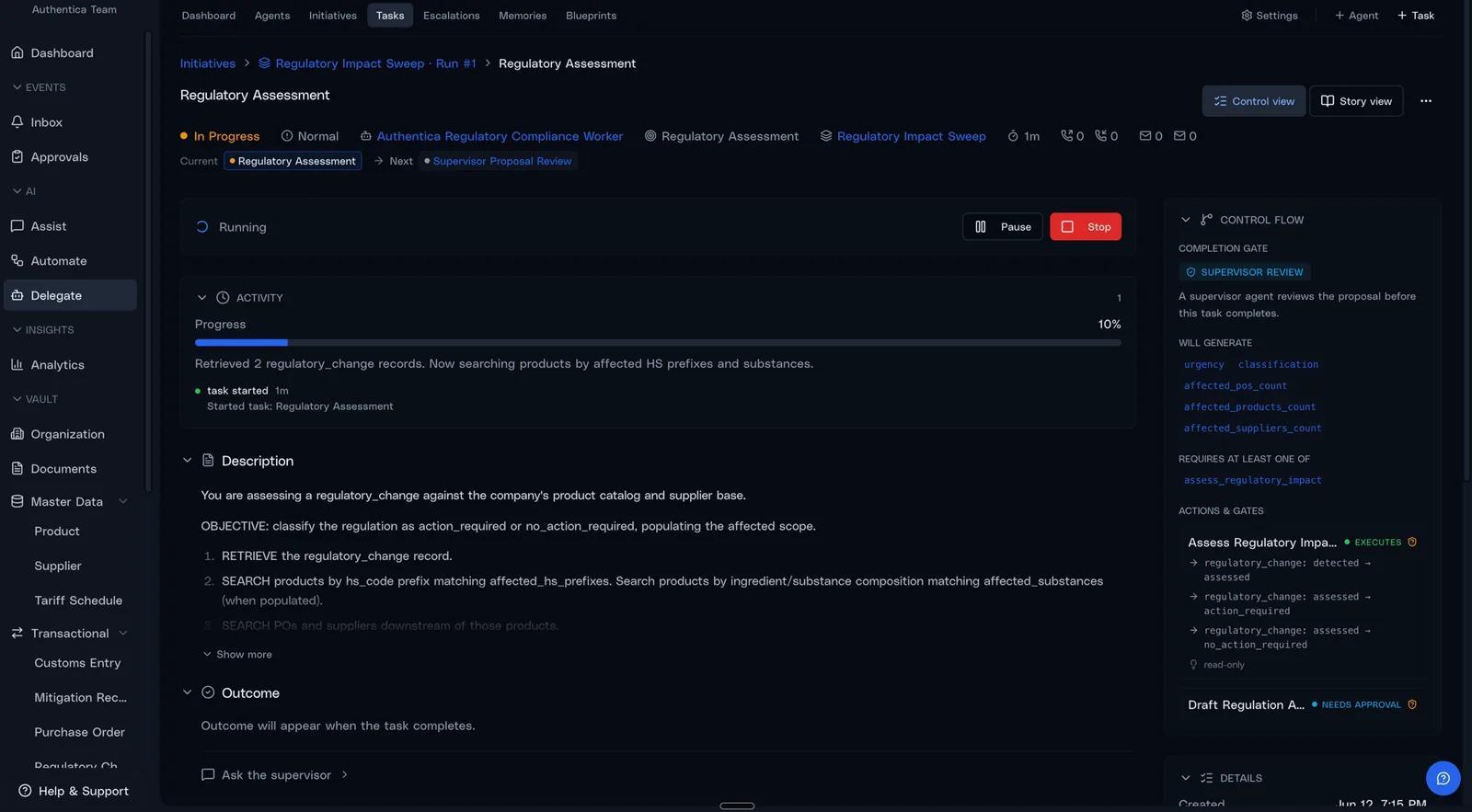
Real product UI · the completion gate routes the proposal to a supervisor before anything ships
04Hiring one
From a described job to a working agent
You supply the person who knows the work. Agents do the drafting, and your people sign off before anything is live.
- 01
Describe the role
Tell the AI forward-deployed engineer what the job is, in Console. It writes a one-page brief of what it will build and which steps need your sign-off.
- 02
Review the change
Once you approve the brief, the role is drafted as a change to your operating model and reviewed as a pull request before it ships.
- 03
Rehearse and test
A rehearsal walks each step against your live records without changing anything, and real scenarios become the cases it must pass before go-live.
- 04
Go live
It starts real work with your people handling every escalation. As it proves itself, you decide which steps it may take on its own.
05Questions
What teams ask before the first one starts
Who is accountable for an AI employee’s work?
Your people. Its approvals and escalations are assigned to people on your team, a team-level sign-off reaches every member of the team who can act on it, and the record shows who approved or overrode each action.
Can an AI employee act without approval?
Only where its role marks an action to run on its own. A step marked for approval stops and waits for a person, with no timer that fails the run, and an action the role does not grant is refused.
How is an AI employee different from a workflow?
A workflow is a defined piece of work: its steps, the agent responsible and the controls that apply. The AI employee is the agent holding that responsibility. It takes new work as it arrives, runs the workflows it owns, and escalates what does not fit.
What happens when the work does not fit the rules?
It goes to a person. The platform raises an escalation when a business rule is broken, a completion check fails or retries run out, and an agent whose role allows it can ask for a review. The escalation offers real options, such as retrying with changes, relaxing a constraint, or approving and resuming, and every choice is recorded.
Can it reach data I cannot?
No. When you ask Kate for something, the work runs with your permissions. Work that carries on after your turn ends stays within the agent’s own scope and approval gates.
What happens to the people who do this work today?
The job usually changes rather than disappears. The person who spent the day on status emails becomes the one who handles the exceptions that need judgment, plus the work there was never time for. We start with one role and one team and let the redesign follow the results.
Choose the first role
Pick one recurring job and the person it will answer to. We build a demo of an agent doing that job on sample data, so you can watch it work before you hand anything over.